Provisioning a device for MQTT
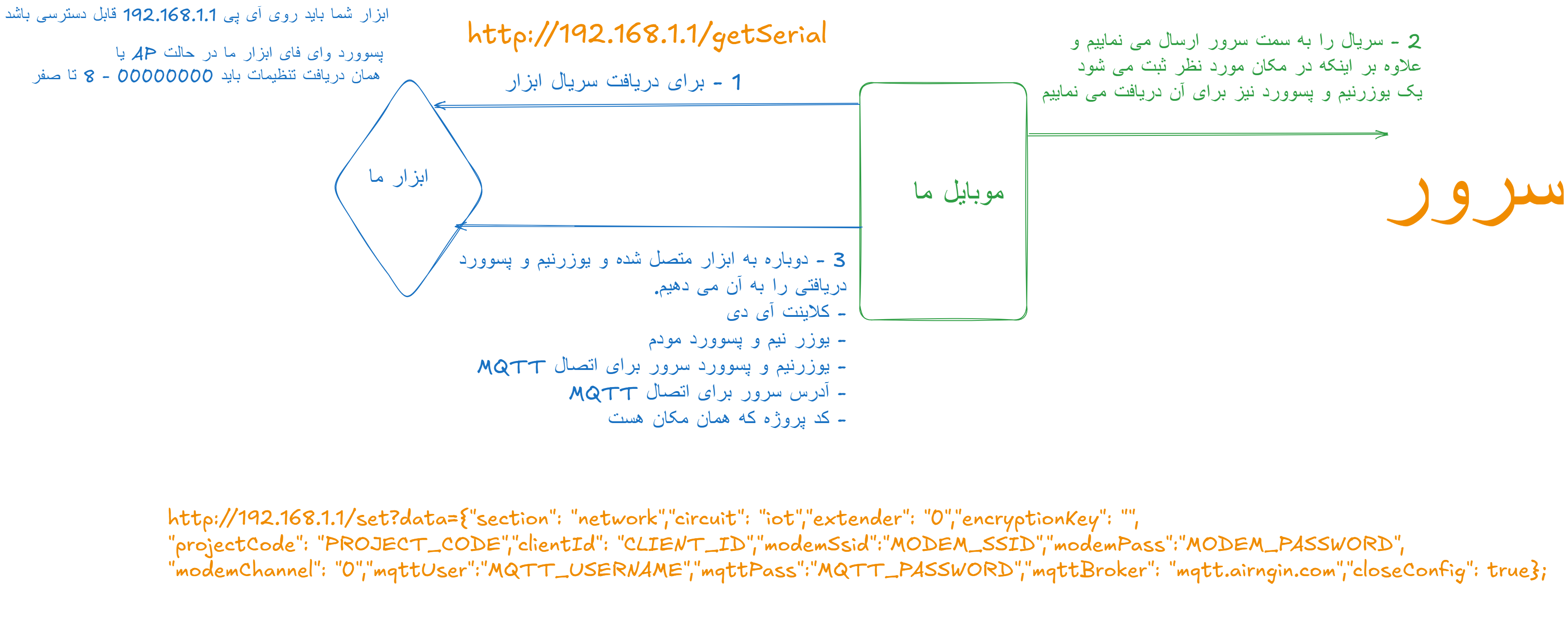
A device must receive its AirNgin MQTT credentials before it can connect to the broker. The legacy SoftAP flow described here is one supported Direct Device provisioning method.
If you need help during integration, contact AirNgin support from the user panel.
For the legacy SoftAP flow:
- the device AP password is
00000000; - the AP SSID should begin with the device
DeviceSerialso the mobile application can identify the correct device; - the device exposes a local endpoint that returns its serial;
- the mobile app obtains server-issued credentials and sends the provisioning payload back to the device.
1. Enter provisioning mode
The device opens its configuration/SoftAP mode and the user connects to that local network from the mobile app.
2. Expose the serial endpoint
The legacy local endpoint is:
http://192.168.1.1/getserial
The response must be the device serial only, for example:
AIRN1234567890
3. Receive server-issued connection settings
If the serial is valid and the device can be associated with the requested project, AirNgin issues the MQTT identity/credentials for that device. Credentials are device-specific and must be persisted and reused.
The mobile app then sends the configuration through the local set endpoint:
http://192.168.1.1/set?data={"section":"network","circuit":"iot","extender":"0","encryptionKey":"","projectCode":"PROJECT_CODE","clientId":"CLIENT_ID","modemSsid":"MODEM_SSID","modemPass":"MODEM_PASSWORD","modemChannel":"0","mqttUser":"MQTT_USERNAME","mqttPass":"MQTT_PASSWORD","mqttBroker":"mqtt.airngin.com","closeConfig":true,"encryptionKeyProject":"","isUseEncrypted":false}
Field meanings:
section: network section identifier used by the provisioning payload.circuit: product/circuit mode identifier.extender: legacy extender flag.encryptionKey: the Direct Device AES key when encrypted messaging is enabled.projectCode: project namespace used by MQTT topics.clientId: complete server-issued MQTT ClientId. Treat it as opaque; do not reconstruct it in firmware.modemSsid/modemPass: Wi-Fi credentials when Wi-Fi is the selected transport.modemChannel: Wi-Fi channel;0means automatic detection in the legacy flow.mqttUser/mqttPass: server-issued MQTT credentials.mqttBroker: broker address.closeConfig: tells the device to leave configuration mode after a successful commit.encryptionKeyProject: reserved for future project/general encryption and currently unused by Direct Device encrypted topics.isUseEncrypted: enables the Direct Device AES layer for topics that support it. Public/non-AES topics such asSendScenarioSetting,ReceiveRunScenario,Time, andTime/Tehranremain unencrypted at this layer.
See Device security for the AES contract.